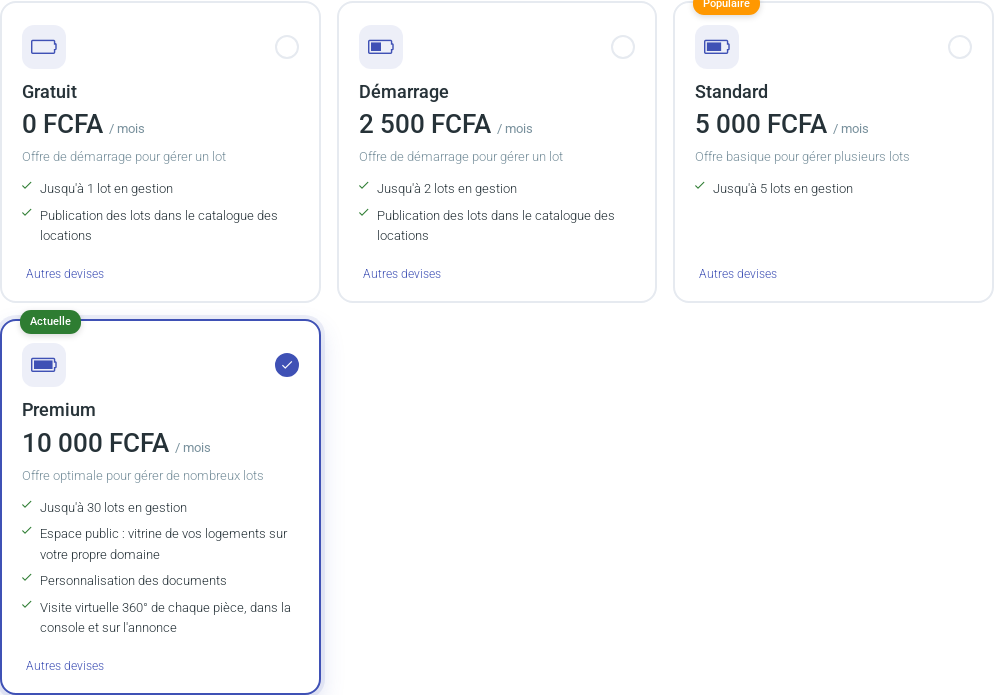
Change plan when you reach a limit (number of rentals, units per address, media storage) or when you want an option reserved for a higher plan (calendar sync, public space, 360° tour…). Each plan is detailed in Plans: rentals, storage and options.
Open the plan change page
Open your account menu at the top right, then Plan and subscription, or click your plan name in the top banner. The top of the page reminds you of your current plan and your subscription status (up to date, overdue or to be settled).Pick a card: your current plan carries the « Current » badge.
Choose the plan and the duration
Choose your plan by clicking a card. The monthly price is shown in your account currency; the « Other currencies » link gives the equivalents.
Choose the duration: a number of months or years, or a shortcut (1, 3, 6 months, 1 year, 2 years). You can pay up to 5 years at once. With yearly payment, one month is free per year paid.
The total to pay updates with every change.
Use a promo code
If you have a promo code, enter it in the field and click Apply: the discount is computed and the total updated. The field is optional. A code is refused with a message if it is invalid, not yet valid, already used by your account, has reached its maximum number of uses, does not apply to the chosen plan or requires a minimum duration.
With a 100% code nothing is due: the plan is activated immediately, without team validation, and the subscription end date is shown.
Pay online or send a request
Two routes lead to the same result.
Online payment with PayPal (bank card or PayPal account), in the block below the form: it pays for the chosen plan and duration. Your subscription is extended automatically after payment.
Change request: click the button that sends the request. Our team receives it, contacts you to validate the settings, then activates the new plan once payment is received.
What changes after validation
The new plan and its limits apply as soon as it is validated. If your subscription is overdue, renewing brings it up to date: see « Subscription up to date » in Plans. If you leave Premium, its options are no longer shown but your settings are kept.
Need more units without changing plan?
At the bottom of the same page, the Extra units block lets you add packs of 10 units to one address, for a chosen number of months, paid with PayPal. See also « Address and unit: what is the difference? » in Plans.